Play-Doh Lettering Duo: Creating Vibrant Typography Without the Mess
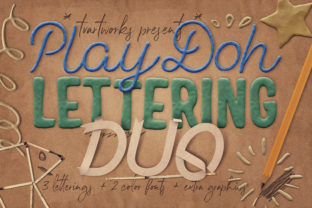
If you are looking for some funny Plasticine or play-doh style lettering graphic elements, then you are at the right place. This collection offers 3D-style letterings and colorful font elements perfect for your new projects with a cool Plasticine aesthetic. These graphics come in high-resolution transparent PNG formats, making them excellent for web design or any print design project where you need to stand out. The core appeal lies in the ability to simply drag and drop different letter elements to create your own custom scenes and typography compositions without needing advanced sculpting skills.
However, before you download this bundle and start designing, it is crucial to understand exactly what you are getting. Many creators rush into using these assets only to face compatibility issues or quality surprises that ruin their workflow. Understanding the specific components of the Play-Doh Lettering Duo bundle is the first step toward avoiding frustration and ensuring your final output looks professional rather than amateurish.
What You Actually Get in the Bundle
The Play-Doh Lettering Duo package is more than just a few cute letters; it is a comprehensive toolkit designed for versatility. When you acquire this set, you receive a diverse range of assets that allow for complex designs. Specifically, the bundle includes:
- 3 Transparent PNG Lettering Elements: These are high-quality (3000 x 3000 pixels) plasticine-style text pieces ready to be layered.
- 2 Plasticine Styles: Unique textures that mimic the look of molded clay.
- 1 Paper Stripes Element: A complementary texture (3000 x 3000 pixels) to add depth to your background.
- 2 Color OTF Fonts: Specialized typefaces that render as 3D plasticine shapes.
- 11 Hi-Res Transparent PNG Graphic Elements: Additional shapes and details (3000 x 3000 pixels) to enhance your composition.
- 9 Hi-Res JPG or PNG Backgrounds/Overlays: Various sizes suitable for different canvas dimensions.
This variety ensures you have everything needed to build a cohesive scene, whether you are designing a birthday invitation, a social media banner, or a product label. The high resolution guarantees that your images will remain crisp even when scaled up for large format printing.
Common Pitfalls with Color Fonts
One of the most significant mistakes designers make when purchasing bundles like this involves the specialized color fonts included. The package contains two OTF fonts, but they do not work universally across all software. A frequent error is attempting to open these files in older versions of Adobe Creative Cloud or non-compatible applications. If you try to use these fonts in an unsupported environment, you may find that the letters appear as standard black outlines or, worse, fail to load entirely.
To ensure success, you must verify your software version before beginning. These fonts are designed to work specifically in Photoshop CC 2017, Illustrator CC 2018, and select Mac applications. Using them in older versions or free alternatives often leads to wasted time trying to troubleshoot issues that could have been avoided with a quick check of system requirements. Always confirm your software version matches the minimum specifications listed by the creator.
Avoiding "Crispy" Borders and Quality Loss
Even if your software is up to date, another common issue arises regarding the visual quality of the rendered text. Users often report seeing "crispy borders" or jagged edges around the colorful letters, which can make a design look unpolished and low-quality. This usually happens because the anti-aliasing settings are not optimized for these specific typefaces. If the borders look sharp and pixelated, your entire design loses its soft, clay-like charm.
The solution is surprisingly simple but often overlooked. You need to manually adjust your font rendering settings. In Adobe Photoshop, go to your character panel and set the font style to Smooth. This setting tells the rendering engine to soften the edges of the colored glyphs, blending them seamlessly with the background. By taking this small step, you preserve the intended tactile feel of the Plasticine style, ensuring the letters look like they were hand-molded rather than digitally generated with harsh lines.
PNG vs. Backgrounds: Knowing When to Use Which
Another area where beginners struggle is asset selection. The bundle provides both transparent PNGs and backgrounds/overlays. A common mistake is using the solid background images when you actually need transparency, or vice versa. For instance, if you are placing your 3D lettering over a photograph of a child's room, using a solid background image will obscure your photo completely.
Conversely, if you are creating a standalone poster and need a textured base, the transparent PNGs might leave gaps where the background should be. To avoid this confusion, always check the file extension and preview. Use the transparent PNG lettering when you want to layer text over other elements. Reserve the JPG or PNG backgrounds for when you need a full backdrop or a specific overlay effect. Mixing these assets incorrectly can result in a cluttered design that lacks focus.
Print vs. Online Usage Considerations
The description states that these assets are ready for print or online use, but this distinction matters significantly for your workflow. While the files are 3000 x 3000 pixels, which is generally sufficient for high-quality digital display, print requirements vary based on DPI (dots per inch). If you plan to use the Play-Doh Lettering Duo for a large physical banner or a book cover, you must ensure your document is set to 300 DPI. If you are using these for a website or social media post, the default screen resolution is usually adequate.
Do not assume that "ready for print" means "ready for any size." Scaling a 3000-pixel image to fit a billboard will inevitably result in pixelation, regardless of how well you handled the font smoothing. Always calculate your required output size before importing the assets. If you need to scale beyond the original dimensions, consider starting with the vector-based OTF fonts if your software supports them, or accept that the maximum printable size is limited by the 3000-pixel constraint.
Making the Right Decision Before You Buy
Before adding this bundle to your cart, take a moment to evaluate your current needs. Are you specifically looking for that playful, 3D clay aesthetic? If your brand identity is strictly minimalist or corporate, these colorful, textured elements might clash with your existing visual language. However, for educators, hobbyists, marketers targeting families, or bloggers looking to add a touch of whimsy, these assets are invaluable.
Check your available storage space and ensure you have the correct version of Adobe Creative Cloud installed. Verify that you are comfortable working with OTF fonts and adjusting anti-aliasing settings. If you are a beginner who prefers drag-and-drop simplicity without any technical tweaking, you might find the font smoothing requirement slightly challenging initially, though it is easily mastered. By understanding these nuances, you can confidently utilize the Play-Doh Lettering Duo to create engaging, high-quality designs that capture attention without the hassle of poor execution.